Description
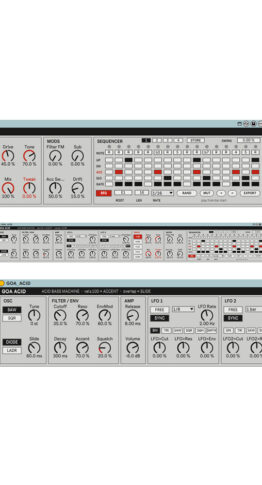
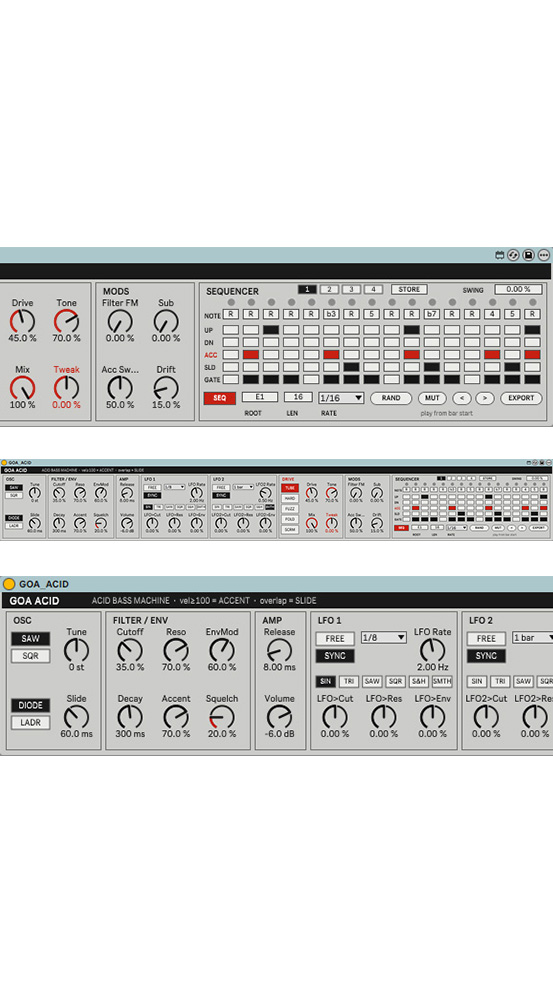
GOA ACID is an acid bass instrument built for Goa / psychedelic trance.
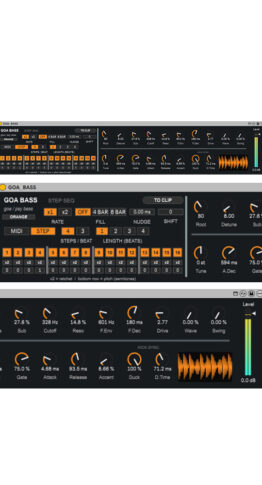
It is a Max for Live instrument for Ableton Live, part of the same series as GOA KICK and GOA BASS.
It combines the squelchy voice of classic 80s acid bass machines with a 16-step sequencer,
a drive section and two LFOs in one device.

■ Requirements
– Ableton Live 12 Suite (or Live 12 Standard + Max for Live)
– Live 12.2 or later recommended (EXPORT uses Max 9, bundled with Live 12.2+)
■ Sections
[OSC]
– SAW / SQR: waveform. SQR is a true, hollow-sounding square wave
– Tune: pitch (+/-24 semitones)
– Slide: glide time between notes
– DIODE / LADR: filter type
– DIODE: the classic squelchy acid filter (recommended)
– LADR: a fatter, rounder ladder filter
[FILTER / ENV]
– Cutoff, Reso, EnvMod (raising it also lowers the closed cutoff, like vintage acid boxes)
– Decay: filter envelope decay (200 ms to 2.5 s)
– Accent: accent strength
– Squelch: drives the filter input for extra grit
[AMP]
– Release: release time after note-off (default 8 ms)
– Volume: output level
– A built-in safety limiter keeps the output from clipping hard
[LFO 1 / LFO 2]
– FREE / SYNC: free rate or tempo-synced (4 bars to 1/32, triplets included)
– Shapes: SIN / TRI / SAW / SQR / S&H / SMTH (smooth random)
– LFO>Cut / LFO>Res / LFO>Env: destinations, bipolar (-100 to +100%)
– The two LFOs add together. Try one fast and one slow
[DRIVE]
– TUBE / HARD / FUZZ / FOLD / SCRM: drive types
– Drive, Tone, Mix
– Tweak (red label): one macro that moves Cutoff, Reso, EnvMod and Decay together.
One automation lane is enough for a build-up
– Automatic gain compensation keeps the level steady as you push the drive
[MODS]
– Filter FM: the oscillator modulates the filter for gnarly overtones
– Sub: adds a square wave one octave below
– Acc Sweep: length and sharpness of the accent “wow”
– Drift: subtle per-note pitch and filter variation for an analog feel
[SEQUENCER]
– 16 steps, each with NOTE (interval from ROOT), UP / DN (octave up / down),
ACC (accent), SLD (slide into the next note) and GATE (note / rest)
– SEQ: internal sequencer on / off (on by default)
– ROOT, LEN (1-16), RATE (1/16, 1/16T, 1/8, 1/32), SWING
– FWD / REV / PING / PEND / RND: play direction
– FWD: forward (1 to 16)
– REV: reverse (16 to 1)
– PING: back and forth, end steps play once
– PEND: back and forth, end steps play twice
– RND: a random step every step
– Directions work within the LEN range
– RAND: random Goa-scale pattern
– MUT: changes 1-2 steps of the current pattern
– < >: rotate the whole pattern by one step
– EXPORT: writes the pattern to a MIDI clip
(select a clip slot on a MIDI track in Session View first)
The clip follows the play direction (RND writes one random take)
– 1-4 / STORE: pattern memory
– Store: press STORE, then a slot
– Recall: press a slot
– Memory is saved with the Live Set
■ Tips
– With SEQ on, the sequencer plays when Live’s transport runs. Start playback from the beginning of a bar
– To play from a MIDI keyboard or clips, turn SEQ off
– Velocity 100 or higher = accent
– Overlap a note into the next one = slide
– Use Live’s own preset saving (device title bar) to store complete sounds and patterns
Includes
GOA_ACID.zip
└ GOA_ACID.amxd
DEMO Download